

A free look at the site, run by a real browser.
The checkup opens the site the way a visitor does: a real browser, on a real connection, clicking through what's actually there. It checks how the page holds up on a phone, how fast it feels, whether search engines and shared links can read it, and whether anything on it looks out of date.
Nothing is guessed. A check that can't be measured says so, in plain language, rather than filling in a score.
The findings come back as a written report, not a dashboard of unexplained numbers. Each item says what was found, why it matters, and what fixing it would take, if anything needs fixing at all.
The report arrives by email a few minutes after the browser finishes, once it's actually looked at the site.
Get your site checked, free.
A website address and an email is all it takes.
Every security tool was green the morning we called. They found something that had been sitting there for two years…
5
sections in the report
phone, speed, search, trust, and signs of age
1
phone screenshot attached
the view a phone visitor actually sees, included when the layout breaks
0
sales calls afterward
the report arrives by email, and nothing else follows it
What comes back
One report, written in plain language.
The report reads like something a person wrote, because it is: a template built from the actual measurements, not a machine-generated score. Each finding names what was checked, what was found, and what it means for someone visiting the site.
Where the site breaks on a phone, the report carries the screenshot a phone visitor would actually see. Where a check couldn't be completed, the report says so instead of guessing at a number.
If the report turns up things you want fixed, ask — you'll get a straight cost range in the first reply, also free.
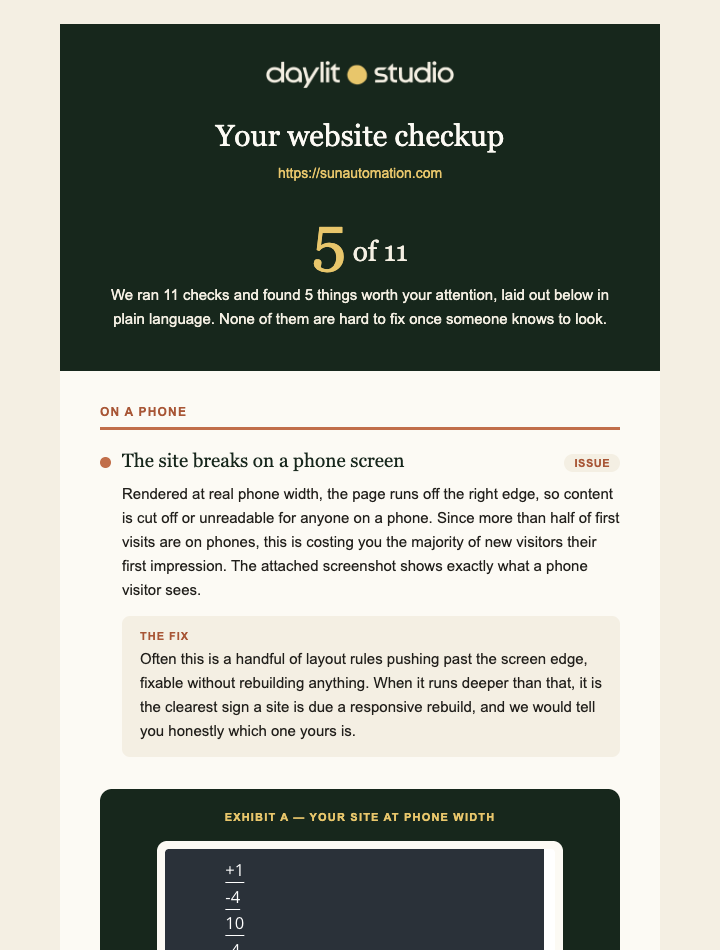
Five sections, one report.
The findings are grouped the same way every time, so the report reads in a consistent order no matter what it finds.
What a typical report covers.
On a phone
Whether the layout holds together at phone width, since most first visits happen there.
How fast it feels
A controlled lab reading of how long the page takes to appear, and how much it weighs.
Being found and shared
Whether search engines can describe the page, and whether a shared link shows a real preview.
Trust and safety
The secure connection, the certificate, tracking behavior before consent, and basic accessibility.
Signs of age
Dated software underneath the site, old markup, and a copyright year that gives it away.
Our old site fought everybody. After the rebuild, people just started finding what they needed…
Answer seven questions about the site as it stands today.
Answer honestly. Nothing is stored, and there's no pitch on the other side.
Worth asking first.
A few honest questions come up before anyone requests a checkup. Here are the straight answers.
Questions worth asking first
Yes. A real report comes back, with no strings attached and nothing to sign up for.
It receives one report and, if there's a follow-up question, one reply. It doesn't go on a list and doesn't start a sequence.
A real browser has to open the site first, the same way a visitor would, and that takes a few minutes. The report is a written document, not a page of numbers generated on the spot.
Some checks depend on a lab or a network response that doesn't always answer. When one doesn't, the report says so rather than filling in a guess.
Yes. The check is read-only: it opens the site the way any visitor's browser would and looks at what loads. Nothing is changed on the site.